
Tactic Board
Available
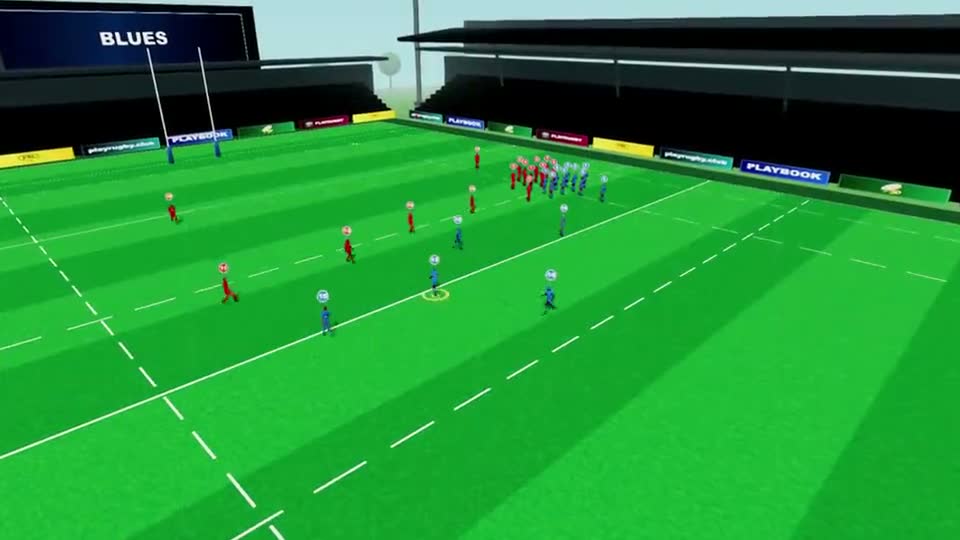
Turn tactical ideas into visual plays with 3D models your players can see, understand and learn before they step onto the pitch.
Key features
Design movement, space and timing
Explain every play step by step
Visualize tactical situations in 3D
Build your team's playbook
Share plays before training
Collaborate with staff and players
1. From Drawing to Play
- Design What Happens Next: Build tactical sequences that show how a play develops, not only where each player starts.
- Movement, Space and Timing: Map runs, passes, support lines and trajectories to explain the complete situation.
- Step-by-Step Animation: Build each play in phases, from the starting position to the next decision point.
- Real Context: Add attackers, defenders, the ball, cones and video references to connect the idea to the pitch.
2. Visualize Before Stepping onto the Pitch
- 3D Visualization: Turn an abstract explanation into a rugby situation that is easier to understand.
- Spend Less Time Explaining: Share the play before training so players arrive knowing what they need to do.
- Professional Export: Create clear, branded documents using your club identity.
3. Build Your Team's Playbook
- Your Own Library: Keep every play as part of your team's tactical knowledge.
- Find What You Need: Search by name, tag or tactical category when it is time to use it.
- Create Once, Use Many Times: Retrieve, duplicate and adapt plays months later without starting from scratch.
4. Organize by Match, Season or Goal
- Tactical Collections: Group plays by match, season, structure or training type.
- Always Ready: Add, remove and reorganize plays to keep every playbook current.
- Visual Identity: Distinguish collections with your own colors and themes.
5. Share and Work as a Team
- Shared Collections: Invite coaches and players with viewing or editing permissions.
- Groups and Invitations: Share with the right people without repeating the same process player by player.
- One Shared Picture: Keep staff and players aligned on what the team is going to train.
6. Learn from the Community
- Public Library: Discover plays shared by other coaches in the PlayRugby community.
- Rate and Discover: Use ratings and activity data to find relevant content.
- Make It Yours: Save a public play to your library and adapt it to your team.
7. Your Space, Club and Preferences
- Personal Profile: Configure your details, club and the badge shown on exports.
- Secure Access: Registration, sign-in and password recovery.
- Preferences: Choose your language and appearance, then work from the device that best fits the moment.
8. Ready for Everyday Coaching
- Adaptable Interface: Consult and work with your plays from the device you use at the time.
- Clear Feedback: Get visual confirmation whenever you save, share or edit.
- Direct Navigation: Reach the functions you use most without detours.